

EditorUpdate
Title styles are now one click away
Select a title in the template editor and 50 recommended styles appear right away. Instead of tuning colors, outlines and fonts one by one, just pick the card you like.
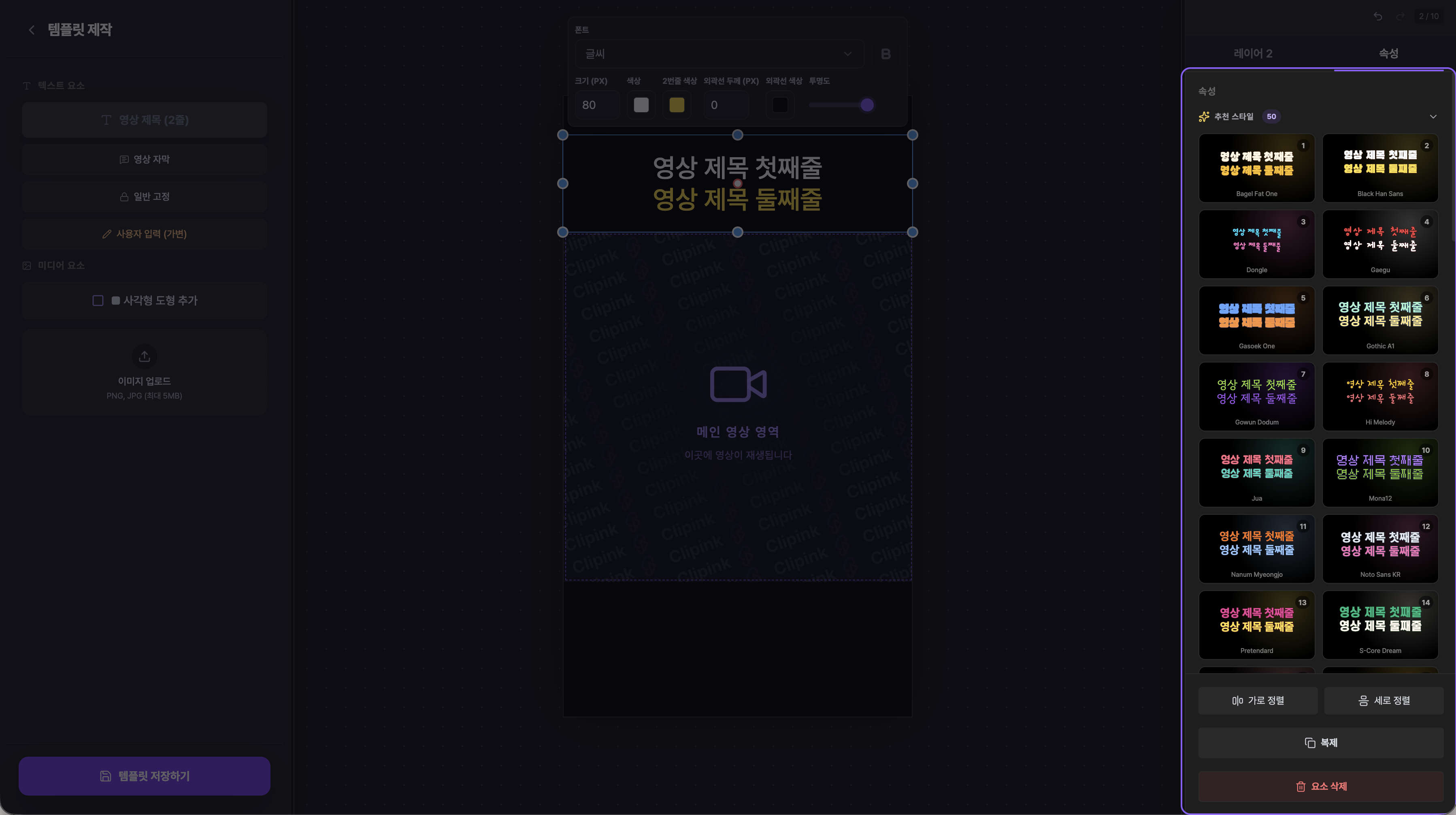
Pick a card, get a finished title
- 1Preview with your own titleEach card shows the first and second line of the title you are actually writing, not sample text. You can see the result before you apply it.
- 2Color, outline and font in one goEvery style bundles a first-line color, a second-line accent color and an outline. Tapping the card applies the font as well.
- 3See what you are usingThe style currently applied to your title is marked with a check. Even after trying several cards, you always know which one is active.
- 4Fonts that fit your languageStyles are matched to fonts that support your selected language, so text never breaks no matter which language you work in.
Still fully editable afterwards
- 1Fine-tune anythingA recommended style is only a starting point. After applying it you can still change the font, size and colors from the floating toolbar on the canvas.
- 2Collapse the listTap the “Recommended styles” header to fold the list away and get more room when you focus on detailed editing.